
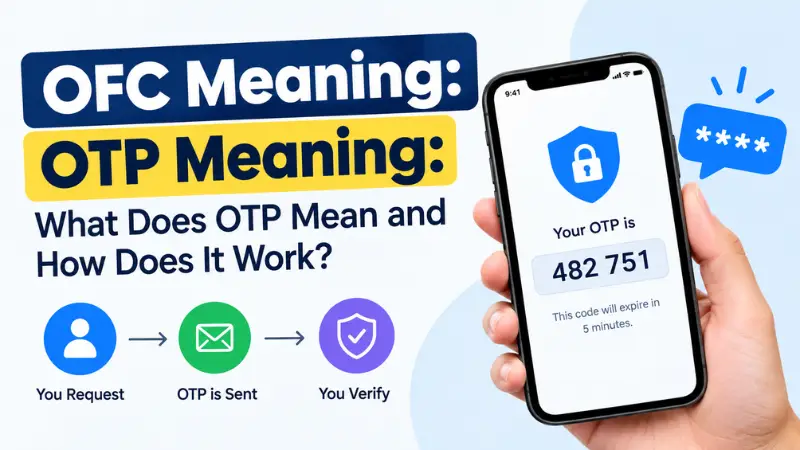
OTP meaning is One-Time Password. An OTP is a temporary security code used to verify your identity when you sign in, make a payment, reset a password, or complete another sensitive online action. Unlike a regular password, an OTP is designed to be used only once and often expires after a short period.
You may receive an OTP by SMS, email, an authentication app, or another secure verification method. For example, when you sign in to your bank account from a new device, the bank may send a six-digit code that you must enter to confirm that it is really you.
In this guide, you’ll learn what OTP stands for, how OTPs work, common OTP examples, and important tips for keeping your verification codes secure.
What Does OTP Mean?
OTP stands for One-Time Password.
It is a unique, temporary code generated for a specific verification attempt. Depending on the service, an OTP may contain numbers or a combination of letters and numbers.
A typical OTP might look like:
482731
The exact format varies by service. Some platforms use six-digit codes, while others may use different lengths or alphanumeric codes.
OTP meaning in simple words
In simple terms, an OTP is a temporary security code that helps prove you are authorized to access an account or complete an action.
For example:
- You enter your username and password.
- The website asks for a verification code.
- You receive an OTP on your phone or authentication app.
- You enter the code.
- The service verifies it and allows you to continue.
How Does an OTP Work?
An OTP is generally generated or delivered as part of an authentication process.
The basic process looks like this:
Request → OTP generated → OTP delivered → Code entered → Verification → Code expires
For example, imagine you’re signing into an online account from a new device.
Step 1: Start the login process
You enter your normal username and password.
Step 2: The service requests additional verification
The service may require an OTP as an additional security check.
Step 3: You receive the code
The OTP might arrive through:
- Text message (SMS)
- Authentication app
- Hardware security device
Step 4: Enter the OTP
You enter the code into the requested field.
Step 5: The service verifies it
If the code is correct and still valid, the authentication process can continue.
Step 6: The OTP expires
After it is used or reaches its expiration time, the code should no longer be valid.
Why Are OTPs Used?
OTPs add an additional layer of security to online accounts and transactions.
A traditional password can potentially be stolen, guessed, or reused across multiple websites. A one-time code provides an additional verification step.
OTPs are commonly used for:
- Account login
- Two-factor authentication (2FA)
- Password resets
- Online payments
- Banking transactions
- New-device verification
- Account recovery
- Confirming changes to account settings
However, an OTP is only one part of a security system. The safety of the overall authentication process also depends on how the code is generated, delivered, and protected.
Common Types of OTPs
There are several ways one-time passwords can be generated or delivered.
SMS OTP
An SMS OTP is sent to your registered phone number through a text message.
Example:
Your verification code is 638214. Do not share this code with anyone.
SMS codes are convenient, but users should never share them with someone who contacts them unexpectedly.
Email OTP
An email OTP is sent to your registered email address.
This method is often used when verifying an account, signing in, or confirming a particular action.
Authenticator App OTP
Authentication apps can generate temporary verification codes directly on your device.
Unlike an SMS code, the code is generated within the authentication app rather than being sent through a text message.
Hardware or Security-Token OTP
Some organizations use dedicated security devices that generate temporary authentication codes.
These can be used as part of stronger authentication systems, particularly in business or high-security environments.
OTP Examples
Here are some common situations where you might encounter an OTP.
| Situation | Example of OTP use |
|---|---|
| Online banking | Confirming a login or transaction |
| Shopping online | Verifying a payment or account |
| Email account | Confirming a new sign-in |
| Social media | Verifying account access |
| Password reset | Confirming account ownership |
| New device | Approving a login from an unfamiliar device |
| Two-factor authentication | Providing a second verification factor |
The exact process differs from one service to another.
OTP vs. Password: What’s the Difference?
A password is generally intended to remain valid until you change it or the service requires a reset.
An OTP is temporary and intended for a specific verification event.
| Feature | Regular Password | OTP |
|---|---|---|
| Meaning | Secret credential used for authentication | One-Time Password |
| Intended use | Repeated use | Usually one use |
| Duration | Often long-term | Temporary |
| Delivery | Usually created by the user | Often generated or delivered by a service |
| Example | A password you create for an account | A temporary six-digit verification code |
Many modern authentication systems use both a password and an OTP to provide additional protection.
Is OTP the Same as 2FA?
Not exactly.
OTP is a type of authentication method, while 2FA (two-factor authentication) is an authentication approach that uses two different factors.
For example, a website might require:
- Something you know — your password
- Something you have — a device that receives or generates a verification code
In that situation, the OTP can be part of a 2FA process.
However, simply receiving an OTP does not automatically mean that every OTP system is being used as two-factor authentication. The overall authentication design matters.
Where Can You Receive an OTP?
Depending on the service, an OTP may be delivered through:
- SMS: Sent to your registered mobile number
- Email: Sent to your verified email address
- Authenticator app: Generated within an authentication application
- Hardware token: Displayed by a physical security device
- Other verification systems: Some services use alternative secure methods
If you receive an unexpected OTP, don’t automatically assume that someone has successfully accessed your account. It may mean someone entered your phone number or email address during a login or verification attempt. Still, unexpected codes are a good reason to review your account security.
What Should You Do If You Receive an Unexpected OTP?
If you didn’t request a verification code, take a cautious approach.
1. Don’t share the code
Never give an OTP to someone who calls, texts, emails, or messages you asking for it.
2. Don’t enter it on an unfamiliar website
Only enter an OTP on the legitimate service where you initiated the action.
3. Check your account
If you repeatedly receive unexpected OTPs, review recent login activity and account-security settings where available.
4. Change your password if necessary
If you believe someone may know your password, change it through the service’s official website or app.
5. Contact the organization directly
For banking, financial, or other sensitive accounts, contact the organization using an official phone number or website—not contact information provided by an unsolicited message.
Can You Share an OTP?
No. You should generally keep OTPs private.
A legitimate service should not require you to disclose a verification code to a stranger over the phone or through a private message.
Scammers sometimes pretend to be representatives from banks, delivery companies, online marketplaces, or other organizations and ask people to provide an OTP. Sharing the code can potentially allow an attacker to complete a verification step on your account.
A simple rule is:
If you didn’t initiate the action, don’t provide the OTP to anyone.
What Does OTP Mean in Texting and Social Media?
In online security, OTP most commonly means “One-Time Password.”
However, in some online communities and social-media conversations, OTP can have other meanings depending on context. For example, in fandom communities, OTP can mean “One True Pairing,” referring to a preferred fictional romantic pairing.
Therefore, context matters.
If someone says:
“Enter the OTP sent to your phone.”
they almost certainly mean One-Time Password.
If someone says:
“They’re my OTP!”
in a fandom discussion, they may mean One True Pairing.
Common OTP-Related Terms
Understanding related terminology can make online security messages easier to interpret.
One-Time Password
A temporary code intended for a single authentication or verification event.
Verification Code
A general term for a code used to confirm an identity, device, account, or action. Some verification codes function as OTPs.
2FA
Two-factor authentication, an authentication method involving two different factors.
MFA
Multi-factor authentication, which uses two or more authentication factors.
Authentication
The process of verifying that someone is who they claim to be.
Authorization
The process of determining what an authenticated user is allowed to access or do.
Tips for Using OTPs Safely
Follow these basic security practices:
- Never share an OTP with another person.
- Don’t enter codes into links sent by unexpected messages.
- Use the official website or app when possible.
- Be cautious if someone creates a sense of urgency and asks for your code.
- Use strong, unique passwords for important accounts.
- Enable multi-factor authentication when appropriate.
- Keep your phone, email account, and authentication apps protected.
- If an account supports stronger authentication options, review them in its security settings.
FAQs
OTP stands for One-Time Password. It is a temporary code used to verify a user or authorize a particular action.
An OTP code is a temporary verification code generated or delivered for a specific authentication event. It is commonly used when signing in, resetting a password, or confirming a transaction.
The validity period depends on the service and authentication method. Some OTPs expire after a short period, while others may have different expiration rules. Always follow the instructions provided by the service.
Generally, no. A one-time password is designed to be used once. After successful use or expiration, it should no longer be valid.
Someone may have entered your phone number or email address during a login or verification attempt. It doesn’t necessarily mean that your account was successfully accessed. Don’t share the code, and review your account security if unexpected OTPs continue.
No. A regular password is generally a reusable credential, while an OTP is a temporary code intended for a specific verification event.
You should not share an OTP merely because someone claims to be customer support. If you need assistance, contact the organization through its official support channels and follow its published security procedures.
In internet and fandom contexts, OTP can also mean “One True Pairing.” The intended meaning depends on the context in which the abbreviation is used.
Final Thoughts on OTP Meaning
The most common OTP meaning in online security is One-Time Password—a temporary verification code designed to help confirm your identity or authorize an action.
You may encounter OTPs when logging into an account, making a payment, resetting a password, or verifying a new device. Because these codes can play an important role in account security, treat them as confidential information and never share them with unexpected callers or messages.
If you’re researching an unfamiliar OTP message, check which service requested it and use that service’s official website or app to verify what the code is for.
SEO metadata
Meta title: OTP Meaning: What Does OTP Stand For?
Meta description: Learn the OTP meaning, what OTP stands for, how one-time passwords work, common OTP types, examples, and essential OTP security tips.
URL slug: /otp-meaning/


